Skip to content
Mi Flauta Dulce Notify me

Recorder notes, fingering and scores · Already in your browser

Mi Flauta DulceLearn the recorder from scratch, one note at a time

Coming soonA path of six stages, the fingering for every note and an app that listens as you play and shows what is going well. You can already try it in your browser: open the web version. The web version follows your device language, and you can change it in Settings.

First stage freeNo adsBaroque and German fingering

Path of the first stage in Mi Flauta Dulce, with the meadow trail and its levels
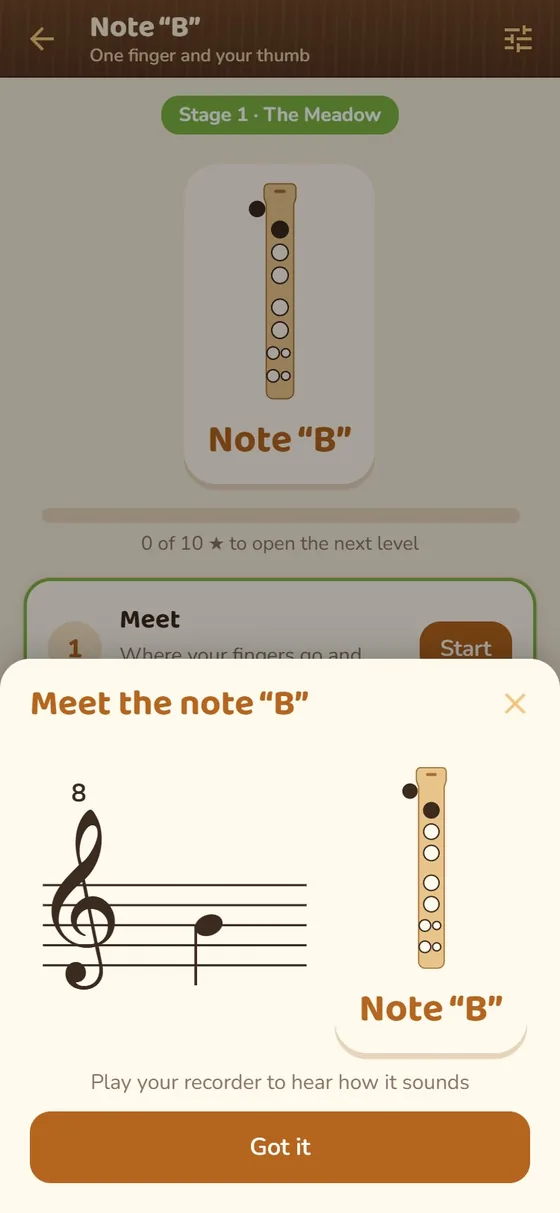
Level for the note B in Mi Flauta Dulce, with the recorder and the Meet, Try and Practice steps
One path, step by step

From the first note to the concert, without getting lost

Each level teaches one thing, practices it with exercises and takes it into songs. The microphone listens as you play.

Meadow path with the first levels, the recorder player and the start sign
The path

Six worlds and 41 levels, from “Before you blow” to the grand concert

The path winds through six stages: the meadow, the forest, the river, the mountain, the clouds and the grand theater. Each stage ends with a review concert.

  • A level is cleared with all its steps and an average of two stars
  • Notes, note values, rests, time signatures and keys, in order
  • You can open any level after a heads-up, so you never get stuck

One medal per stage: earned when you finish every level of the stage.

  • The meadowFirst notes
  • The forestThe right hand
  • The riverRhythm
  • The mountainAccidentals
  • The cloudsHigh notes
  • The grand theaterA real musician
Meet B screen, with the note on the staff and the fingering on the recorder
Every note

The note on the staff and the fingers on the recorder

Every new note is shown with its place on the staff and the exact fingering, and it sounds when you tap it on the screen. Then “Try” and “Practice” take the note into short exercises.

  • Baroque (English) or German fingering, your choice
  • The microphone listens to your recorder on the device itself and nothing is recorded
  • A tuner and a chart with every note
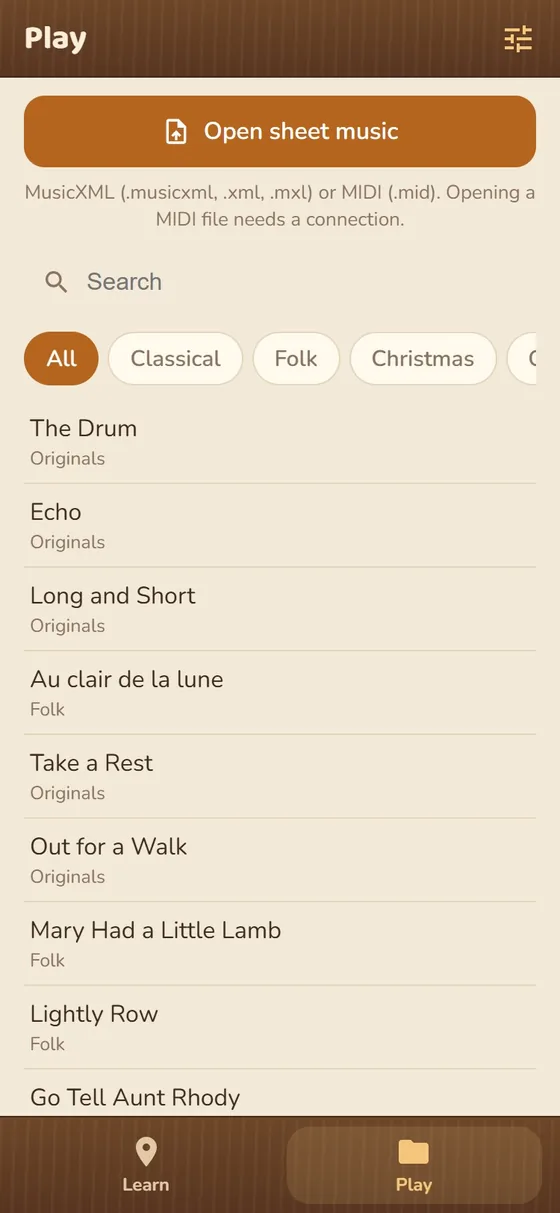
Play tab with the song list and the Open score button
Songs

Songs to practice, and your own scores

Besides the path, there is a library of classical pieces, traditional songs and Christmas carols. You can also open your own scores in MusicXML and MIDI.

  • Search and filters by collection
  • Open MusicXML and MIDI (MIDI needs a connection)
  • Songs use the same microphone and the same helpers

Made for learning, not for distracting

Little text, big buttons, everything in sight.

A path with order

Each level opens the next. You learn one thing at a time and come back to it in the songs.

It listens

The app hears each note through the microphone and shows what is going well. The sound is analyzed on your device and never recorded.

Baroque or German

You choose your fingering and see the exact fingers for every note, with a tuner and a chart of all the notes.

Your scores

Open MusicXML and MIDI files, besides the songs in the library.

For families and teachers

Made for learning at home or in class.

No ads

No advertising and no trackers.

Screenshots

The path, a level, the note and the songs

The meadow path
The meadow path
A level with its steps
The note and its fingering
Song library
Song library
How it works

From a note to a song

  1. Meet

    Every new note with its place on the staff, its fingering and its sound.

  2. Try

    Long notes that the app listens to through the microphone.

  3. Practice

    Exercises with what you already know, with stars depending on how they go.

  4. Play songs

    The notes you have learned, in melodies to play from start to finish.

Learning the recorder from scratch: where to start

The recorder is one of the easiest instruments to start with: you can make a first sound in minutes. The hard part is doing it in order, so here are the usual starting points.

1. Before you blow

Start with how to hold the recorder and how to blow: gently and steadily, without forcing the air. A hard breath makes the note shrill and out of tune. In the app, the first level is called “Before you blow” and covers exactly that.

2. The first notes, from few fingers to more

A common order is to begin with the notes played with few fingers: B (thumb and one finger), A (two fingers) and G (three), and then high C and D. With three or four notes you can already play the first simple songs. Mi Flauta Dulce follows that path: each new note is studied with its fingering and exercises, and then practiced in songs.

3. Baroque (English) or German fingering

There are two fingering systems for the recorder, Baroque (also called English) and German. They agree on most notes and differ on a few, such as F, so a recorder of one type is played with the chart for that type. What matters is knowing which recorder you have and using its fingering. In the app you choose the one that matches yours.

4. A little every day

A few minutes every day beat one long session. First you listen to the note or the exercise, then you play it slowly, and only when it comes out right do you speed up. In the app, the microphone listens to what sounds and marks what is going well.

Need a chart now? Try the free recorder fingering chart in your browser.

Frequently asked questions

Common questions about Mi Flauta Dulce

What is Mi Flauta Dulce?

It is an app for learning the recorder from scratch. It has a path of six stages and 41 levels, with the fingering for every note, exercises and songs, and it uses the microphone to listen to you and mark what is going well. “Mi Flauta Dulce” is Spanish for “my recorder”.

When will it be out and where can I download it?

There is no date yet. The app is being tested on Google Play and the iPhone version is planned, with no date. Anyone who leaves their email will get a single notice when it comes out.

Can I try it now?

Yes. The web version is already open and works in the browser of your phone or computer: apps.clavedemi.com/mi-flauta-dulce/app/. The microphone needs your browser’s permission.

Which recorder is it for?

It is made for the soprano recorder, with Baroque (English) or German fingering to match yours.

How does it know whether I play well?

With the microphone: it recognizes the note that sounds and tells you whether it is the one you should play. The sound is analyzed on your device and never recorded. It works best in a quiet place.

What is the difference between Baroque and German fingering?

They are two fingering systems that agree on most notes and differ on some, such as F. Use the one for your recorder. The app lets you choose.

How much will it cost?

The first stage, the tuner and the note chart will be free. The rest of the path and the library unlock with a one-time purchase, no subscription; the stores set the price for your country.

Does it have ads?

No. There is no advertising and no trackers.

Can I open my own scores?

Yes, in MusicXML and MIDI. Converting a MIDI file needs an internet connection.

Who is it for?

For anyone who wants to learn from scratch, at home or in class: families and teachers.

Mi Flauta Dulce

Learning the recorder, very soon on your phone

The launch notice will be turned on soon. For now there is no notification list and no release date. Meanwhile, the web version already works: open Mi Flauta Dulce in your browser.

The app is not yet published in the stores: the content and features on this page may change before its release.

Mi Flauta DulceComing soon
Notify me