Tactics board · 11v11 · 7v7
Soccer tactics board, online and free
Place the players, draw passes and runs, and download the play as an image to send to the team group chat. No sign-up, nothing to install.
Pick a piece and tap the field to place it; drag it to move it. To draw a pass or a run, pick the arrow and drag from one point to another.
This is the basic board. In Banquillo the board does much more: you resize each piece separately, add rings, hurdles and mini goals (which can be rotated), and every drill saves its own board. The app is currently available in Spanish only.
See the appIn three steps
Pick the field
Full field, small-sided or half field. What you drew adjusts when you switch fields.
Place and draw
Players from two teams with their numbers, a ball, cones and arrows for passes and runs.
Download the image
A PNG file, ready to send in a message or add to a practice plan.
What a tactics board is for
A tactics board lets you explain a play or a drill before running it on the field: where each player stands, where each one moves and who gets the pass. A clear picture saves long explanations and works as a reminder for the next game or practice.
Common uses
- Set up a drill: place the cones and the groups, and mark the path of the ball.
- Explain a set piece: corner kicks, free kicks or throw-ins.
- Go over the lineup: each player’s position in 7v7 or 11v11.
- Send the idea to the group: the downloaded image is shared through any messaging app, and nobody has to install anything.
How each thing is drawn
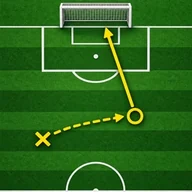
The solid arrow marks a pass and the dashed arrow marks a player’s run without the ball. After you pick an arrow in the toolbar, drag from the starting point to the end point; you can then move the ends with the yellow circles. With a piece selected, the delete button removes it, and the player’s number is changed in the number field.
Common questions
Is it free?
Yes. The board is free and does not ask for sign-up or an email address.
Is what I draw saved?
No. The page saves nothing: if you close it, the board is lost. To keep it, download the image. In the Banquillo app each board stays saved in the team’s drill or session.
Does it work on a phone?
Yes. It is built for fingers: pieces are placed with a tap and dragged to move them. On small screens, turn the phone sideways to see the field larger.
Which fields are there?
Full field (11v11), small-sided (7v7) and half field.
Can I use the image with my club or in my practices?
Yes. The downloaded image is yours to use in practice plans, messages or team documents. It carries a small board mark in the corner.
How is it different from the board in the app?
The web board is for drawing a single play. Banquillo’s is saved in each drill, adds rings, hurdles and mini goals, lets you change the size of each piece, and is linked to the team, the match-day squad and the games. The app is currently available in Spanish only.
Want to keep the board?
This board saves nothing: when you close the page, it is gone. In Banquillo every drill and every match-day squad has its board saved in the team, with rings, hurdles and mini goals, the size of each piece and 350 built-in drills to start with. The app is currently available in Spanish only.